
- Published on
Your AI Coding Agent Isn’t Broken. Your Context Is.
Most AI agent failures aren’t model problems. They’re context architecture problems.
A few months ago I was building a feature with the BMAD Method and Claude Code. CLAUDE.md was set up. The workflow was running. I was reading the planning output through Ghostty, which is where I catch whether the agent actually understands the task.
It didn’t. No matter how well I crafted my prompts, I wasn’t getting the output I wanted. I iterated. I clarified. The results stayed inconsistent in a way I couldn’t completely diagnose.
The context had gone stale during development. That was just the version I happened to catch. The deeper problem was that my context setup wasn’t doing what I thought it was doing. Instructions had accumulated without cleanup. Older constraints conflicted with newer ones. The model had no concrete examples of the patterns it was supposed to follow, just prose descriptions. I was letting sessions run to 80 to 90 percent context before compacting, not realizing that compaction preserves what work to do next while quietly compressing the constraints around how to do it.
I caught the drift during a planning review, used BMAD’s course-correct agent to recover, and moved on. But the experience stuck with me. The model wasn’t the problem. My prompting wasn’t the problem. The context wasn’t doing its job. Not because it was wrong, but because it wasn’t precise enough for the decisions the model needed to make.
The gap isn’t the model
You’ve had this experience. You give Claude Code a task. It searches through your codebase, loads what feels like half the repo, and produces a plan that looks reasonable but misses something important. You iterate. You clarify. The results are inconsistent in a way you can’t diagnose.
Meanwhile someone on Twitter is one-shotting a complex refactor with the exact same model. Same tool. Dramatically different results.
Most people blame the model, or their prompting. But Claude Opus 4.6 can reason through complex problems, navigate large codebases, and produce production-quality code. The bottleneck isn’t capability. It’s visibility. Did the model get the right information before it made decisions?
Andrej Karpathy described context engineering as “the delicate art and science of filling the context window with just the right information for the next step.” Phil Schmid, Staff ML Engineer at Hugging Face, put it more directly: “Most agent failures are not model failures anymore, they are context failures.”
The same patterns show up over and over. The agent explores your codebase and loads the wrong files, things that mention the right keywords but aren’t the right context. Your codebase has unconventional patterns the agent never discovers, so it falls back to generic training priors that look correct but don’t fit. Critical constraints exist only in someone’s head, on Slack, in a meeting recording. Nowhere the agent can find them.
Every one of these is a context failure. The mechanics behind them are what make them fixable.
Your agent isn’t ignoring your rules. It’s drowning in noise.
You give Claude Code a moderately vague prompt. It greps your codebase for relevant keywords. It finds files that mention the right terms but aren’t actually relevant: old documentation, outdated test fixtures, verbose comments that restate what the code already says, dead code that shares a name with something current.
By the time it’s done exploring, 40 to 50 percent of the context window is consumed. The plan looks plausible but quietly misses a constraint buried in the noise.
The model isn’t reading your context sequentially like a for-loop. It’s resolving a competition. Every token in your context window competes with every other token for the model’s attention. Load enough noise and the signal gets diluted.
The ACL 2024 paper “Same Task, More Tokens” tested GPT-4, GPT-3.5, Gemini Pro, and Mistral across different input lengths. Reasoning performance degraded meaningfully at just 3,000 tokens, far below any model’s technical context limit. The degradation wasn’t caused by the model running out of capacity. The additional tokens caused it, regardless of whether they were relevant.
A context window filled with noise isn’t just inefficient. It actively degrades the quality of the plan your agent produces.
More context does not improve performance. It often makes it worse.
The reason your critical rules get ignored has nothing to do with how you wrote them
You’ve heard the advice to keep your CLAUDE.md concise. Most people nod and keep adding rules anyway. There’s a specific mechanical reason why that doesn’t work.
In 2023, researchers at Stanford and UC Berkeley published “Lost in the Middle: How Language Models Use Long Contexts.” They tested multiple models including GPT-3.5 and Claude 1.3 and found that accuracy dropped by more than 30 percent when relevant information was placed in the middle of a long context versus at the beginning or end. The pattern held across different model sizes, different context lengths, and different tasks.
Performance was strong at the start of the context window. Strong at the end. Significantly degraded in the middle.
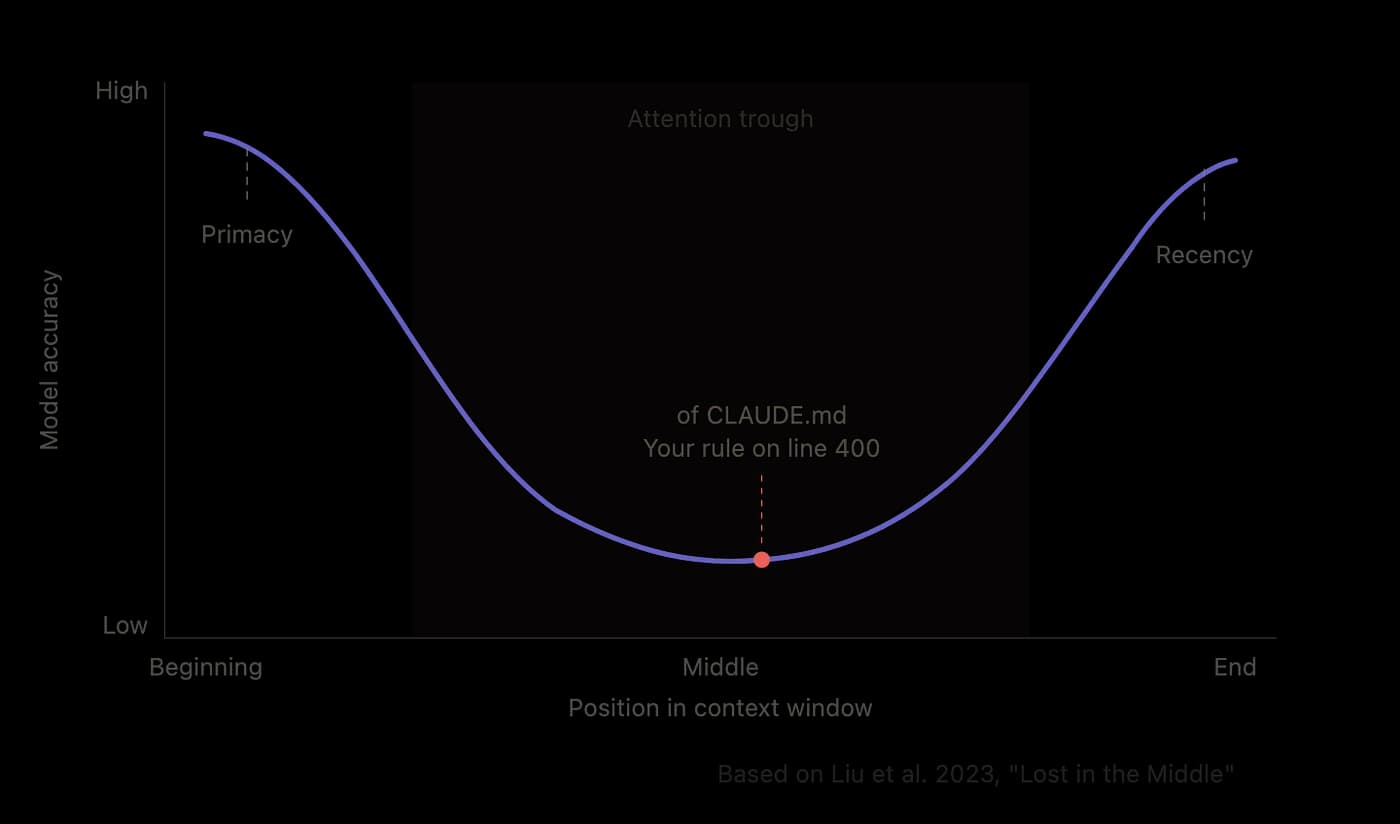
MIT researchers confirmed the architectural reason in 2025. Transformers use causal masking, where each token can only attend to tokens that came before it. Tokens near the beginning of a context accumulate more attention weight across layers because every subsequent token attends to them. A token at position 1 gets attended to by every token that follows. A token at position 400 only gets attended to by tokens from position 401 onward.
Your prompt doesn’t change this. The model’s weights are frozen at inference time. Your context just has to work within these learned constraints.
A 650-line CLAUDE.md has a large middle zone where attention is weakest. Any critical constraint written there sits exactly where the model is least likely to act on it. A 60-line file has no meaningful middle zone. Everything sits near a boundary. The lost-in-the-middle problem effectively disappears.
That’s not a coincidence. It’s the entire reason the 60-line recommendation exists.
You wrote 20 rules. Your agent is following all of them simultaneously less than half the time.
Your CLAUDE.md has 20 rules. You’ve thought carefully about each one. They’re specific, actionable, relevant to your codebase.
Instruction compliance doesn’t work additively. It works multiplicatively.
If each rule has a 95 percent chance of being followed, the probability that all 20 are followed simultaneously is roughly 0.95 to the power of 20. That’s about 36 percent.
You wrote 20 careful rules. Statistically, your agent is following all of them at the same time less than half the time. Adding more rules doesn’t improve reliability. It reduces it.
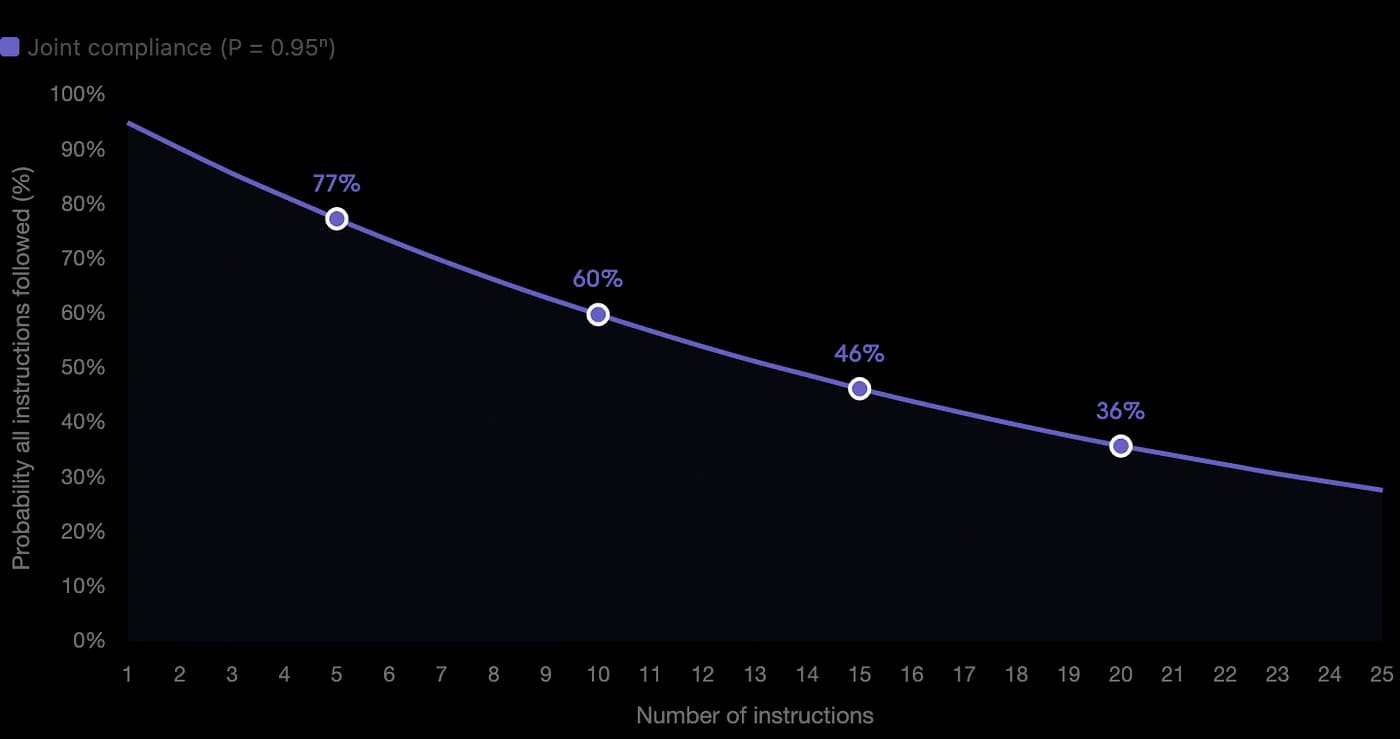
Instruction compliance decay Joint probability of all instructions being followed simultaneously, it modeled as P = 0.95^n. At 20 rules, your agent follows all of them less than 36% of the time.
The “Curse of Instructions” paper quantified this. Compliance follows P^n: success probability per instruction raised to the power of the number of instructions. At 10 instructions, joint compliance drops to around 60 percent. At 20, you’re at 36.
This compounds directly with the positional bias problem. A bloated CLAUDE.md doesn’t just push instruction count past reliable compliance thresholds. It also guarantees that some instructions land in the middle zone where attention is weakest. Both problems hit simultaneously.

Proportions are accurate. ~50* system prompt instructions take up roughly 71% of the visual bar, your 20 rules take the remaining 29%. The visual makes the budget pressure feel immediate.
The HumanLayer team found that Claude Code’s own system prompt already contains roughly 50 instructions before you add a single line to your CLAUDE.md. Every rule you add competes against a budget the model is already managing.
Become a Medium member
The fix isn’t better instructions. It’s fewer, more targeted ones, placed where they’ll actually be seen, distributed across your codebase so they only load when relevant. That’s the architecture we’ll build in Parts 2 and 3.
Your legacy codebase is fighting the model’s training data. The model usually wins.
This one shows up most often in codebases that have been around for a while.
You give the agent clear instructions. You’ve kept your CLAUDE.md concise. The context is clean. And still, the agent produces code that drifts toward generic patterns instead of the ones your codebase actually uses. You tell it to follow your custom error handling approach. It writes a standard try-catch. You correct it. A few exchanges later, it drifts back.
That’s cognitive inertia. The model’s training data exerting gravitational pull on everything it produces.
These models were trained on billions of lines of conventional code: standard authentication patterns, common error handling, typical loop structures. Those patterns are deeply embedded. When a model encounters a codebase that deviates from convention, a legacy authentication system, a non-standard framework, an unconventional but intentional architectural choice, the conventional pattern is simply easier to reach for.
The Inverse IFEval paper, accepted at ICLR 2026, measured this directly. Models show roughly 30 percent performance drops when given counterintuitive instructions versus conventional ones. The more unconventional your codebase, the more strongly this compounds.
The tell is when the model produces code that compiles, passes your linter, and still feels wrong to anyone who knows the codebase. Technically correct. Contextually off. That gap between syntactic validity and architectural fit is cognitive inertia in practice.
There are two versions of this. Pattern inertia is when the model resists unconventional code patterns because they’re far from its training distribution. Prompt momentum is when the model gets conditioned by early conversation patterns and carries them through the session inappropriately. If you start a conversation working on your Python backend and then ask for changes to a Node.js service with different concurrency patterns, the agent applies Python-flavored assumptions to JavaScript code because the conversation established those patterns early.
Both have the same solution: concrete examples of the pattern in action, placed in the right location in your codebase. Prose instructions alone rarely override training data gravity. Working code does.
Why agentic search is a slot machine on large codebases
When you give Claude Code a prompt, it extracts keywords and greps through your codebase to find relevant files. Find the relevant code, understand the patterns, produce a good plan. That’s the theory.
In practice, on a large codebase, the results are inconsistent in a way that feels random. Sometimes you get a plan that accounts for every constraint. Sometimes you get one that misses something critical. You can’t reliably predict which.
The slot machine behavior isn’t random. It’s completely predictable. You get good results when the agent happens to find the right files. You get bad results when it doesn’t. The variance is entirely in what the search surfaces, not in the model’s ability to reason once it has the right information.
Augment Code found that adding structured codebase intelligence on top of Claude Code improved output quality by 80 percent across 900 pull request attempts against real production codebases. That 80 percent gap is roughly what native agentic search leaves on the table. Fix the search surface and you fix the variance.
The most critical context is the context that was never written down
Search limitations are one problem. But there’s a harder one: the information the agent needs doesn’t exist anywhere it can reach.
A developer asks Claude Code to remove dead code from their codebase. The explore sub-agents find a database column called legacy_id that doesn’t appear to be used anywhere. They flag it for removal. What they don’t know is that legacy_id is used by a partner integration documented only in a Slack conversation from three years ago. That column gets deleted. The integration breaks.
No search capability finds what only exists in someone’s memory.
A 2025 Qodo survey found that 65 percent of developers cited missing context as their top issue during AI-assisted refactoring, more often than hallucinations. That number isn’t about search quality. It’s about the context never being written down in the first place.
Every codebase has tribal knowledge: why a particular pattern exists, which external systems depend on a specific column, what trade-offs were made during a migration three years ago. That knowledge lives in people’s heads, in Slack threads, in meeting recordings. It’s not in the codebase. No amount of search improvement fixes that. The only fix is making it explicit and putting it where the agent can find it.
What this adds up to
Six problems. All connected. All pointing at the same diagnosis.
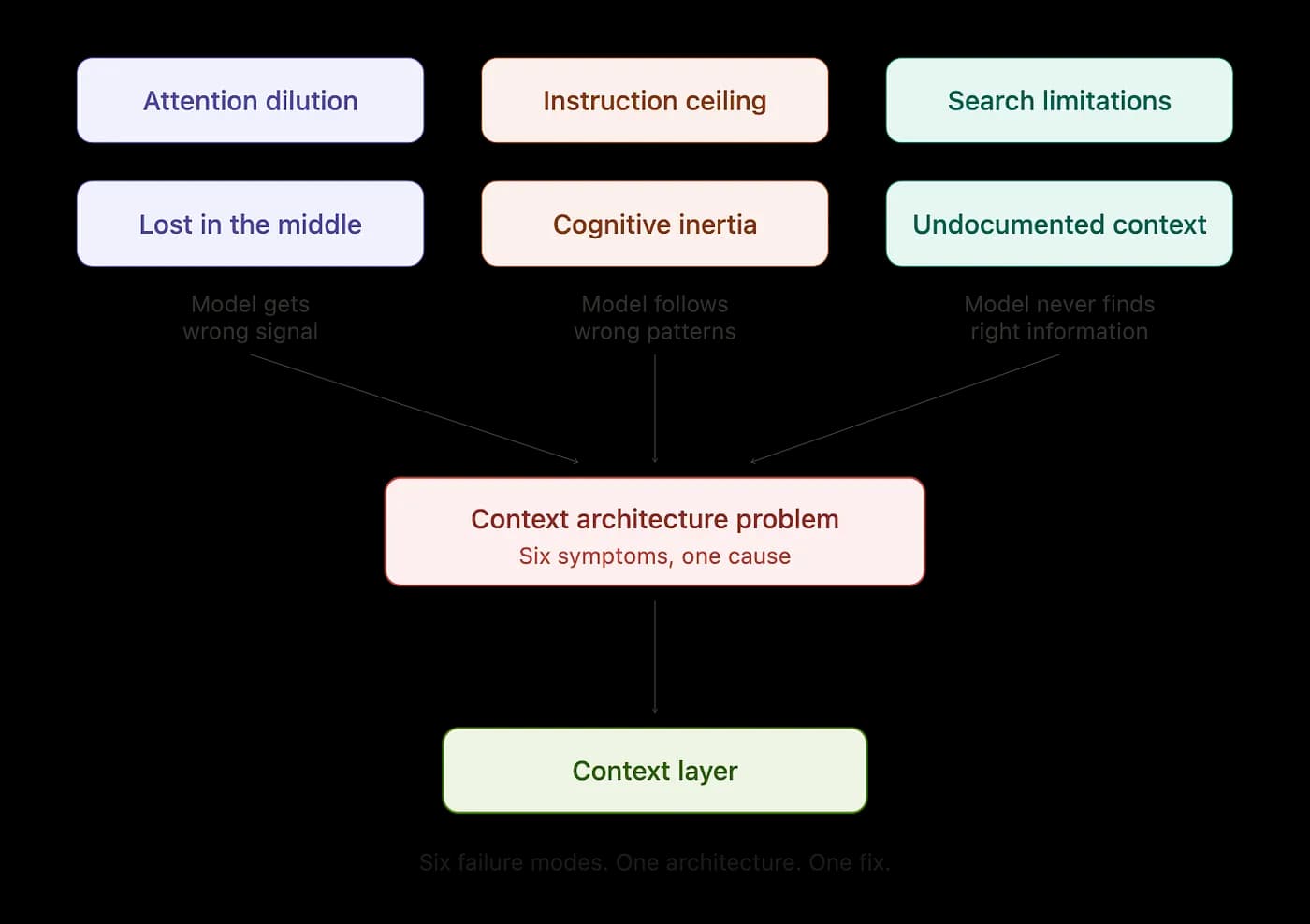
Failure mode map Six failure modes, three clusters, one diagnosis. Every context problem in this article traces back to the same missing architecture.
Irrelevant tokens don’t just waste space in your context window. They compete with the relevant ones, and the plan your agent produces degrades because of it. Put critical information in the wrong position and the model’s learned attention patterns work against you. Stack more than a handful of instructions and joint compliance drops below coin-flip odds. Give the model an unconventional codebase with only prose descriptions of your patterns and its training data pulls it back toward convention. Agentic search can only find what it can find, and the quality of what it surfaces varies wildly. And the most critical context, the tribal knowledge that explains why your codebase is the way it is, was never written down in a place the agent can reach.
These aren’t six separate problems. They’re six symptoms of the same missing architecture.
None of these are model limitations. They’re context architecture problems. And they all have the same solution: a system that controls what the model sees, when it sees it, and where it sits in the context window.
That system is called a context layer. A context layer controls what information loads, when it loads, and how it’s positioned in the model’s attention window. In Part 2, we’ll look at the design principles behind building one, starting with a finding from Vercel’s engineering team that stopped me when I first read it. They removed 80 percent of their agent’s tools. Their success rate went from 80 percent to 100 percent. Response time dropped 3.5 times. That result isn’t a quirk. It’s evidence of a principle that should change how you think about everything you put in front of your agent.
Part 2: The Context Layer, a mental model for fixing it. I’m working on it now.
This space is evolving fast. What I’ve written here comes from building real applications with these tools and digging into the research behind why they behave the way they do. If your experience contradicts something here, I want to hear it. That’s how we all get better at working with these tools.
If this resonated, a clap helps other developers find it. Which of these six failure modes have you hit? Drop it in the comments.
References
- Karpathy, Andrej. Context engineering definition. Twitter/X
- Liu et al. (2023). “Lost in the Middle: How Language Models Use Long Contexts.” Stanford / UC Berkeley. arXiv
- Levy et al. (2024). “Same Task, More Tokens: the Impact of Input Length on the Reasoning Performance of Large Language Models.” ACL 2024. arXiv
- “The Curse of Instructions.” Instruction compliance decay (P^n). Paper
- “Inverse IFEval.” Accepted at ICLR 2026. OpenReview
- Vercel Engineering. “We removed 80% of our agent’s tools.” vercel.com/blog
- Qodo. “The State of AI Code Quality 2025.” qodo.ai/reports
- Augment Code. Context Engine MCP integration, 80% quality improvement with Claude Code. buildmvpfast.com
- HumanLayer. Claude Code system prompt instruction count analysis. humanlayer.dev
- Authors
- Name